USA & Canada
USA & Canada
Blog

GrabCAD Pulse: The New Home Screen for GrabCAD Print

Meet GrabCAD Pulse, the new home screen in GrabCAD Print 1.120 for printer status, licenses, recent projects, product updates and support.

GrabCAD Pulse Hero image

Accelerate Product Design with Stratasys

Discover Advanced 3D Printing product design capabilities for accurate, high-performance prototypes with our Solutions Guide

What is GrabCAD Pulse? 

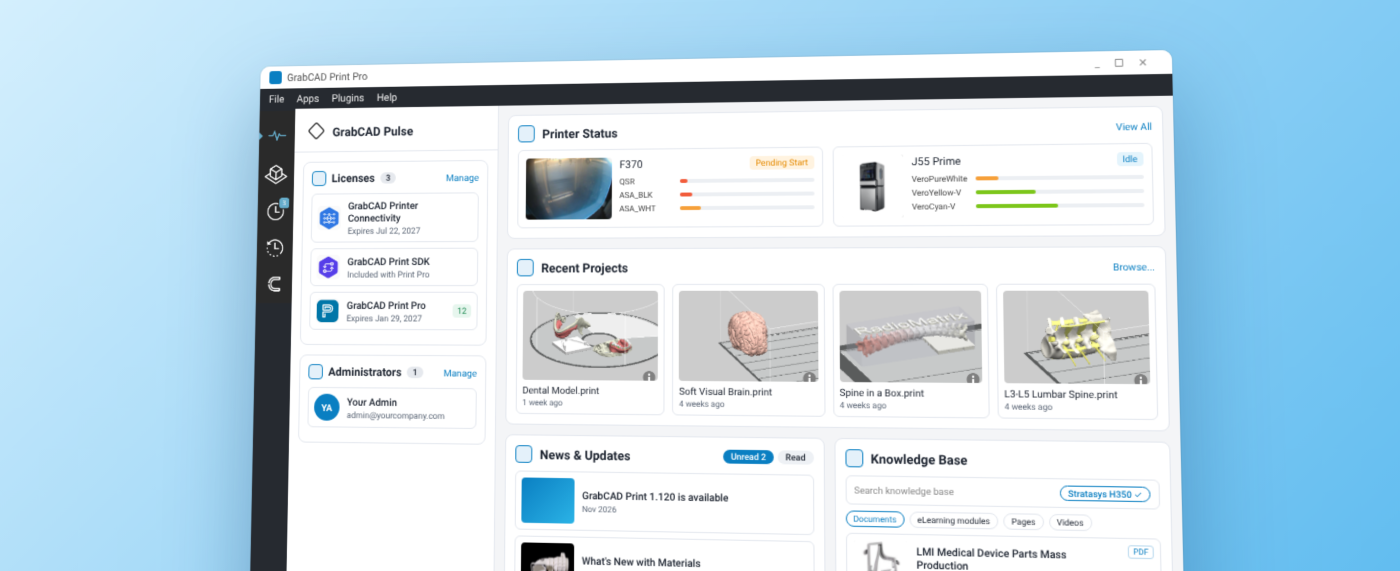
GrabCAD Pulse is the home screen introduced in GrabCAD Print 1.120. It gives users one place to view license information, GrabCAD administrators, printer status, recent projects, Stratasys news and printer-specific Knowledge Base resources.

What can you do with GrabCAD Pulse? 

  • Licenses. View every license available to your company, how many seats are in use, whether a license is a trial and when it expires. 
  • Administrators. Find your company’s GrabCAD administrators and their email addresses, so you know who to contact when you need help. 
  • Printer Status. See what each printer is doing and how much material is left, with a link to the full printer view when you need more detail. 
  • Recent Projects. Return to your latest .print files with thumbnails, file sizes and the date each project was last modified. Select a project to pick up where you left off. 
  • News & Updates. Review product updates, materials news and Stratasys event announcements. An unread count makes new items easy to identify. 
  • Knowledge Base. Search documents, eLearning modules, support pages and videos already filtered for your printer. 
Updated home screen of GrabCAD Print Pro Pulse software update.

Why we built GrabCAD Pulse 

Pulse was designed around a simple problem: the information needed to manage 3D printing work was often separated from the work itself. New features could be buried in release notes, license status was not always clear and support answers were spread across multiple sites. 

By bringing operational information, projects, updates and support into GrabCAD Print, Pulse reduces the number of places users need to check before getting started. It puts useful information on the first screen you see, so you can spend less time searching and more time printing. 

grabcad pulse

See GrabCAD Pulse for yourself 

Update to GrabCAD Print 1.120 to explore Pulse. You can also read the GrabCAD Pulse FAQ, review the GrabCAD Print 1.120 release notes or take a two-minute interactive tour.

What's next for GrabCAD Pulse 

Pulse is the first version of a new home for GrabCAD. We will continue improving it and adding information that helps GrabCAD Print users understand what is happening across their printers, projects and software environment.